
Guide très facile React — OFPPT Notes دليل React سهل جدا — ملاحظات OFPPT
Guide facile étape par étape. Copie. Colle. Ça marche. On va créer une petite application React avec login, modules et calcul de note. Pas de base de données. Juste JSON et React state.
دليل سهل خطوة بخطوة. انسخ. الصق. وسيعمل. سنبني تطبيقا صغيرا بـ React فيه دخول، وحدات، وحساب النقطة. بدون قاعدة بيانات. فقط JSON و React state.
1. Avant de commencer 1. قبل أن نبدأ
▼Avant d’écrire du code, installe Node.js. npm arrive avec Node. On n’utilise pas PHP. On n’utilise pas MySQL. C’est une app React seulement.
قبل كتابة الكود، ثبت Node.js. npm يأتي مع Node. لا نستعمل PHP. لا نستعمل MySQL. هذا تطبيق React فقط.
| Outilالأداة | Ce qu’il fautما نحتاجه |
|---|---|
| Node.js | 18+ |
| npm | vient avec Nodeيأتي مع Node |
| VS Code | stableمستقر |
cmd, puis Entrée.
أين نكتب؟ → في CMD. اضغط Windows + R، اكتب cmd، ثم Entrée.
node -v
npm -v
Si tu vois des numéros (par exemple v22 et 10), c’est bon. Node et npm sont prêts. إذا رأيت أرقاما (مثلا v22 و 10)، فهذا جيد. Node و npm جاهزان.
node ou npm, installe Node. Puis ferme CMD. Ouvre CMD encore une fois. Relance les deux commandes.
⚠ إذا لم يعرف Windows الأمر node أو npm، ثبت Node. ثم أغلق CMD. افتحه من جديد. أعد الأمرين.
2. Créer ton projet 2. أنشئ مشروعك
▼Pas besoin de cd ni de mkdir. Tu crées le dossier avec Windows. Puis tu ouvres CMD déjà dedans.
لا تحتاج cd ولا mkdir. أنشئ المجلد بويندوز. ثم افتح CMD وهو داخل المجلد.
- Clic droit sur le Bureau (ou Documents) → Nouveau → Dossier. Donne-lui un nom (exemple :
react projet). - زر يمين على سطح المكتب (أو المستندات) → جديد → مجلد. سمّه (مثال:
react projet). - Ouvre ce dossier (double-clic). Il peut être vide. C’est normal.
- افتح هذا المجلد (نقرتان). يمكن أن يكون فارغا. هذا عادي.
- Clique en haut dans la barre d’adresse (le chemin). Efface. Tape
cmd. Appuie sur Entrée. - انقر أعلى في شريط العنوان (المسار). امسح. اكتب
cmd. ثم Entrée.
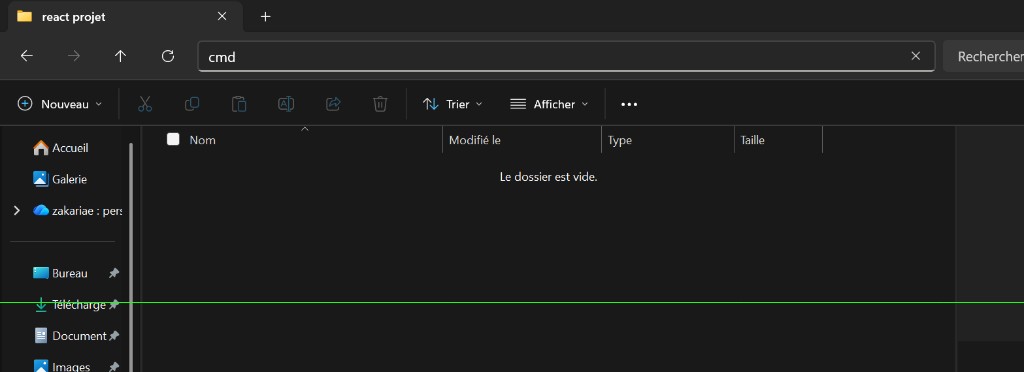
Tape cmd ici, puis Entrée. CMD s’ouvre dans ton dossier.
اكتب cmd هنا ثم Entrée. يفتح CMD داخل مجلدك.
npm create vite@latest first-app-react -- --template react
cd first-app-react
npm install
npm run dev
npm create vite@latestcrée first-app-react avec le modèle React.npm create vite@latestينشئ first-app-react بقالب React.npm installtélécharge les paquets.npm installيحمل الحزم.npm run devlance le site ici : http://localhost:5173.npm run devيشغل الموقع هنا: http://localhost:5173.
first-app-react dans VS Code.
✅ يجب أن ترى صفحة Vite / React. إذا رأيتها، فالمشروع يعمل. بعد ذلك افتح مجلد first-app-react في VS Code.
first-app-react.
⚠ لا تغلق CMD عندما يكون الموقع يعمل. لأمر آخر، افتح CMD ثاني. ثم ادخل إلى first-app-react.
3. Ce que fait OFPPT Notes 3. ماذا يفعل OFPPT Notes
▼On construit cette app : login, tableau modules, calcul de note. Pas de base. Les données sont dans un fichier JSON.
نبني هذا التطبيق: دخول، جدول وحدات، حساب نقطة. بدون قاعدة. البيانات في ملف JSON.
| Écranالشاشة | Fichierالملف | Données JSONبيانات JSON |
|---|---|---|
| Connexionالدخول | Login.jsx |
initialUsers |
| Modulesالوحدات | ModuleTable.jsx |
initialModules |
| Note finaleالنقطة النهائية | CalculNote.jsx |
N1, N2, EFF |
Un objet JSON = 1 ligne. Un tableau JSON = la table. Voici les modules de l’app :
كائن JSON = صف واحد. مصفوفة JSON = الجدول. هذه وحدات التطبيق:
| id | code | nom | coefficient |
|---|---|---|---|
| 1 | M101 | Programmation | 2 |
| 2 | M102 | Réseaux | 2 |
| 3 | M103 | Développement web | 3 |
4. Dossiers Vite 4. مجلدات Vite
▼Dans VS Code, ouvre first-app-react. Ces fichiers = OFPPT Notes.
في VS Code افتح first-app-react. هذه الملفات = OFPPT Notes.
div#root.صفحة HTML الخاصة بـ Vite. فيها div#root.
src/assets et le compteur Vite. On n’en a pas besoin.
يمكنك تجاهل src/assets وعدّاد Vite. لا نحتاج إليهما.
5. Fichier JSON initialData.js 5. ملف JSON initialData.js
▼Données d’OFPPT Notes : 1 compte admin, 3 modules (M101, M102, M103). Pas de base. Juste ce fichier.
بيانات OFPPT Notes: حساب admin واحد، 3 وحدات (M101، M102، M103). بدون قاعدة. فقط هذا الملف.
first-app-react.
أين نكتب؟ → في CMD ثاني، داخل مجلد first-app-react.
cd first-app-react
mkdir src\datasrc/data/initialData.js. Colle ce code.
أين نلصق؟ → في VS Code. أنشئ الملف src/data/initialData.js. الصق هذا الكود.
export const initialUsers = [
  {
    id: 1,
    email: 'admin@ofppt.ma',
    password: 'password',
    name: 'Admin OFPPT',
  },
]

export const initialModules = [
  { id: 1, code: 'M101', nom: 'Programmation', coefficient: 2 },
  { id: 2, code: 'M102', nom: 'Réseaux', coefficient: 2 },
  { id: 3, code: 'M103', nom: 'Développement web', coefficient: 3 },
]| Tableau JSONمصفوفة JSON | Colonnes (clés)الأعمدة (المفاتيح) |
|---|---|
initialUsers | id, email, password, name |
initialModules | id, code, nom, coefficient |
6. Login 6. تسجيل الدخول
▼Login.jsx est l’écran de connexion d’OFPPT Notes. Il cherche admin@ofppt.ma dans initialUsers. Si email + mot de passe matchent, App.jsx ouvre Modules + Calcul.
Login.jsx هو شاشة دخول OFPPT Notes. يبحث عن admin@ofppt.ma في initialUsers. إذا تطابق البريد وكلمة المرور، App.jsx يفتح الوحدات والحساب.
| Dans Loginفي Login | Pourquoi iciلماذا هنا |
|---|---|
users |
la liste JSON des comptes (props depuis App)قائمة JSON للحسابات (من App) |
email / password |
ce que l’élève tape (state du formulaire)ما يكتبه الطالب (state للنموذج) |
users.find(...) |
cherche le compte dans le JSONيبحث عن الحساب في JSON |
src/Login.jsx. Colle ce code.
أين نلصق؟ → في VS Code. أنشئ src/Login.jsx. الصق هذا الكود.
import { useState } from 'react'

function Login({ users, onLogin }) {
  const [email, setEmail] = useState('')
  const [password, setPassword] = useState('')
  const [error, setError] = useState('')

  function handleSubmit(e) {
    e.preventDefault()
    const found = users.find(
      (u) => u.email === email && u.password === password
    )
    if (found) {
      setError('')
      onLogin(found)
    } else {
      setError('Email ou mot de passe incorrect.')
    }
  }

  return (
    <div className="login-page">
      <form className="login-box" onSubmit={handleSubmit}>
        <h1>Connexion OFPPT Notes</h1>
        {error ? <p className="error">{error}</p> : null}
        <label>
          Email
          <input
            type="email"
            value={email}
            onChange={(e) => setEmail(e.target.value)}
            required
          />
        </label>
        <label>
          Mot de passe
          <input
            type="password"
            value={password}
            onChange={(e) => setPassword(e.target.value)}
            required
          />
        </label>
        <button type="submit">Se connecter</button>
        <p className="hint">Compte test : admin@ofppt.ma / password</p>
      </form>
    </div>
  )
}

export default LoginonLogin(found) envoie l’objet user à App.jsx. C’est comme ça que OFPPT Notes sait qui est connecté.
💡 onLogin(found) يرسل كائن المستخدم إلى App.jsx. هكذا يعرف OFPPT Notes من هو المتصل.
export default Login en bas. Sinon App.jsx ne trouve pas le fichier.
⚠ اكتب export default Login في الأسفل. وإلا لن يجد App.jsx الملف.
7. Tableau Modules CRUD 7. جدول الوحدات CRUD
▼ModuleTable.jsx affiche les modules d’OFPPT Notes dans un <table>. Chaque ligne = 1 objet { code, nom, coefficient }. Ajouter / modifier / supprimer change la liste en mémoire. Pas de base. Si tu recharges, on revient à M101, M102, M103.
ModuleTable.jsx يعرض وحدات OFPPT Notes في <table>. كل صف = كائن { code, nom, coefficient }. إضافة / تعديل / حذف يغيّر القائمة في الذاكرة. بدون قاعدة. إذا أعدت التحميل نرجع إلى M101، M102، M103.
src/ModuleTable.jsx. Colle ce code.
أين نلصق؟ → في VS Code. أنشئ src/ModuleTable.jsx. الصق هذا الكود.
import { useState } from 'react'

function ModuleTable({ modules, setModules }) {
  const [code, setCode] = useState('')
  const [nom, setNom] = useState('')
  const [coefficient, setCoefficient] = useState(1)
  const [editId, setEditId] = useState(null)

  function resetForm() {
    setCode('')
    setNom('')
    setCoefficient(1)
    setEditId(null)
  }

  function handleSubmit(e) {
    e.preventDefault()
    if (editId) {
      setModules(
        modules.map((m) =>
          m.id === editId
            ? { ...m, code, nom, coefficient: Number(coefficient) }
            : m
        )
      )
    } else {
      const newModule = {
        id: Date.now(),
        code,
        nom,
        coefficient: Number(coefficient),
      }
      setModules([...modules, newModule])
    }
    resetForm()
  }

  function startEdit(module) {
    setEditId(module.id)
    setCode(module.code)
    setNom(module.nom)
    setCoefficient(module.coefficient)
  }

  function handleDelete(id) {
    setModules(modules.filter((m) => m.id !== id))
    if (editId === id) {
      resetForm()
    }
  }

  return (
    <section className="card">
      <h2>Modules</h2>
      <form className="row-form" onSubmit={handleSubmit}>
        <input
          placeholder="Code"
          value={code}
          onChange={(e) => setCode(e.target.value)}
          required
        />
        <input
          placeholder="Nom"
          value={nom}
          onChange={(e) => setNom(e.target.value)}
          required
        />
        <input
          type="number"
          min="1"
          max="10"
          value={coefficient}
          onChange={(e) => setCoefficient(e.target.value)}
          required
        />
        <button type="submit">{editId ? 'Modifier' : 'Ajouter'}</button>
        {editId ? (
          <button type="button" onClick={resetForm}>
            Annuler
          </button>
        ) : null}
      </form>
      <table>
        <thead>
          <tr>
            <th>Code</th>
            <th>Nom</th>
            <th>Coefficient</th>
            <th>Actions</th>
          </tr>
        </thead>
        <tbody>
          {modules.map((m) => (
            <tr key={m.id}>
              <td>{m.code}</td>
              <td>{m.nom}</td>
              <td>{m.coefficient}</td>
              <td>
                <button type="button" onClick={() => startEdit(m)}>
                  Modifier
                </button>
                <button type="button" onClick={() => handleDelete(m.id)}>
                  Supprimer
                </button>
              </td>
            </tr>
          ))}
        </tbody>
      </table>
    </section>
  )
}

export default ModuleTable| Actionالعمل | Code Reactكود React |
|---|---|
| Ajouterإضافة | [...modules, newModule] |
| Modifierتعديل | modules.map(...) |
| Supprimerحذف | modules.filter(...) |
modules et setModules viennent du parent. C’est le state de App.jsx.
✅ modules و setModules يأتيان من الأب. هذا هو state الخاص بـ App.jsx.
8. Calcul note 8. حساب النقطة
▼Dans OFPPT Notes, la note finale = (N1 × 1 + N2 × 3 + EFF) ÷ 9. N1 = 1ère année. N2 = 2ème année. EFF = épreuve. Réussi si ≥ 10.
في OFPPT Notes النقطة النهائية = (N1 × 1 + N2 × 3 + EFF) ÷ 9. N1 = السنة 1. N2 = السنة 2. EFF = الاختبار. ناجح إذا ≥ 10.
| N1 | N2 | EFF | Calculالحساب | Résultatالنتيجة |
|---|---|---|---|---|
| 12 | 14 | 60 | (12×1 + 14×3 + 60) ÷ 9 | 12.67 → Réussiناجح |
| 8 | 7 | 6 | (8×1 + 7×3 + 6) ÷ 9 | 7.11 → Ajournéراسب |
src/CalculNote.jsx. Colle ce code.
أين نلصق؟ → في VS Code. أنشئ src/CalculNote.jsx. الصق هذا الكود.
import { useState } from 'react'

function CalculNote() {
  const [n1, setN1] = useState('')
  const [n2, setN2] = useState('')
  const [eff, setEff] = useState('')
  const [result, setResult] = useState(null)

  function handleSubmit(e) {
    e.preventDefault()
    const note1 = Number(n1)
    const note2 = Number(n2)
    const noteEff = Number(eff)
    const noteFinale = (note1 * 1 + note2 * 3 + noteEff) / 9
    const rounded = Math.round(noteFinale * 100) / 100
    setResult({
      noteFinale: rounded,
      reussi: rounded >= 10,
    })
  }

  return (
    <section className="card">
      <h2>Calcul de la note</h2>
      <p>Formule : (N1 × 1 + N2 × 3 + EFF) ÷ 9</p>
      <form className="row-form" onSubmit={handleSubmit}>
        <input
          type="number"
          min="0"
          max="20"
          step="0.01"
          placeholder="N1"
          value={n1}
          onChange={(e) => setN1(e.target.value)}
          required
        />
        <input
          type="number"
          min="0"
          max="20"
          step="0.01"
          placeholder="N2"
          value={n2}
          onChange={(e) => setN2(e.target.value)}
          required
        />
        <input
          type="number"
          min="0"
          max="100"
          step="0.01"
          placeholder="EFF (0 à 100)"
          value={eff}
          onChange={(e) => setEff(e.target.value)}
          required
        />
        <button type="submit">Calculer</button>
      </form>
      {result ? (
        <p className={result.reussi ? 'ok' : 'ko'}>
          Note finale : {result.noteFinale} / 20 —{' '}
          {result.reussi ? 'Réussi' : 'Ajourné'}
        </p>
      ) : null}
    </section>
  )
}

export default CalculNote(N1 + N2×3 + EFF) / 9 est bon. Sans parenthèses, le calcul est faux.
⚠ لا تنسَ الأقواس. (N1 + N2×3 + EFF) / 9 صحيح. بدون أقواس الحساب خطأ.
9. Assembler App.jsx 9. تجميع App.jsx
▼App.jsx est OFPPT Notes entier. D’abord Login. Après connexion : tableau Modules + Calcul. user et modules sont la mémoire de l’app.
App.jsx هو تطبيق OFPPT Notes كله. أولا Login. بعد الدخول: جدول الوحدات + الحساب. user و modules هما ذاكرة التطبيق.
src/App.jsx. Efface tout. Colle ce code.
أين نلصق؟ → في VS Code. افتح src/App.jsx. امسح كل شيء. الصق هذا الكود.
import { useState } from 'react'
import { initialUsers, initialModules } from './data/initialData'
import Login from './Login'
import ModuleTable from './ModuleTable'
import CalculNote from './CalculNote'
import './App.css'

function App() {
  const [user, setUser] = useState(null)
  const [modules, setModules] = useState(initialModules)

  function handleLogin(loggedUser) {
    setUser(loggedUser)
  }

  function handleLogout() {
    setUser(null)
  }

  if (!user) {
    return <Login users={initialUsers} onLogin={handleLogin} />
  }

  return (
    <div className="app">
      <header className="topbar">
        <h1>OFPPT Notes</h1>
        <div className="topbar-right">
          <span>{user.name}</span>
          <button type="button" onClick={handleLogout}>
            Déconnexion
          </button>
        </div>
      </header>
      <main className="content">
        <ModuleTable modules={modules} setModules={setModules} />
        <CalculNote />
      </main>
    </div>
  )
}

export default Appsrc/main.jsx. Vite l’a déjà bien écrit.
✅ لا تلمس src/main.jsx. Vite كتبه بشكل صحيح.
10. Style simple App.css 10. تنسيق بسيط App.css
▼Un CSS simple. Tableau, formulaire, page login. Copie. Colle. Ça marche.
تنسيق بسيط. جدول، نموذج، صفحة الدخول. انسخ. الصق. وسيعمل.
src/App.css. Efface tout. Colle ce code.
أين نلصق؟ → في VS Code. افتح src/App.css. امسح كل شيء. الصق هذا الكود.
* {
  box-sizing: border-box;
}

body {
  margin: 0;
  font-family: 'Segoe UI', Tahoma, sans-serif;
  background: #e8eef5;
  color: #1e293b;
}

.app {
  min-height: 100vh;
}

.topbar {
  display: flex;
  justify-content: space-between;
  align-items: center;
  gap: 12px;
  padding: 14px 20px;
  background: #0f4c81;
  color: #fff;
}

.topbar h1 {
  margin: 0;
  font-size: 1.2rem;
}

.topbar-right {
  display: flex;
  align-items: center;
  gap: 12px;
}

.content {
  max-width: 900px;
  margin: 0 auto;
  padding: 20px;
}

.card {
  background: #fff;
  border: 1px solid #cbd5e1;
  padding: 18px;
  margin-bottom: 18px;
}

.card h2 {
  margin: 0 0 12px;
  font-size: 1.1rem;
}

.row-form {
  display: flex;
  flex-wrap: wrap;
  gap: 8px;
  margin-bottom: 14px;
}

.row-form input {
  padding: 8px 10px;
  border: 1px solid #94a3b8;
  min-width: 120px;
}

button {
  padding: 8px 12px;
  border: 0;
  background: #0f4c81;
  color: #fff;
  cursor: pointer;
}

button[type='button'] {
  background: #64748b;
}

table {
  width: 100%;
  border-collapse: collapse;
}

th,
td {
  border: 1px solid #cbd5e1;
  padding: 8px 10px;
  text-align: left;
}

th {
  background: #f1f5f9;
}

.login-page {
  min-height: 100vh;
  display: flex;
  align-items: center;
  justify-content: center;
  background: #e8eef5;
}

.login-box {
  width: 100%;
  max-width: 360px;
  background: #fff;
  border: 1px solid #cbd5e1;
  padding: 24px;
  display: flex;
  flex-direction: column;
  gap: 12px;
}

.login-box h1 {
  margin: 0 0 8px;
  font-size: 1.2rem;
  text-align: center;
}

.login-box label {
  display: flex;
  flex-direction: column;
  gap: 4px;
  font-size: 0.9rem;
}

.login-box input {
  padding: 8px 10px;
  border: 1px solid #94a3b8;
}

.error {
  color: #b91c1c;
  margin: 0;
}

.hint {
  font-size: 0.8rem;
  color: #64748b;
  text-align: center;
  margin: 0;
}

.ok {
  color: #166534;
  font-weight: 700;
}

.ko {
  color: #b91c1c;
  font-weight: 700;
}src/index.css. Ce n’est pas grave. Notre App.css suffit pour l’écran principal.
يمكنك ترك src/index.css. لا مشكلة. ملف App.css يكفي للشاشة الرئيسية.
11. Tester + Debug 11. التجربة وتصحيح الأخطاء
▼Relance le serveur si besoin. Ouvre le navigateur. Connecte-toi. Ajoute un module. Calcule une note.
أعد تشغيل الخادم إذا لزم. افتح المتصفح. سجّل الدخول. أضف وحدة. احسب نقطة.
first-app-react.
أين نكتب؟ → في CMD، داخل first-app-react.
npm run dev- Ouvre http://localhost:5173.
- افتح http://localhost:5173.
- Login : admin@ofppt.ma / password.
- الدخول: admin@ofppt.ma / password.
- Tu vois le tableau des modules. Ajoute. Modifie. Supprime.
- ترى جدول الوحدات. أضف. عدّل. احذف.
- En bas, calcule : N1=12, N2=14, EFF=60 → 12.67, réussi.
- في الأسفل احسب: N1=12، N2=14، EFF=60 → 12.67، ناجح.
Si ça ne marche pas إذا لم يعمل
| Problèmeالمشكلة | Que faireماذا تفعل |
|---|---|
| Page blancheصفحة بيضاء | Regarde le terminal CMD. Ou F12 → Console.انظر إلى CMD. أو F12 → Console. |
| Failed to resolve import | Vérifie le nom du fichier : Login.jsx, data/initialData.js.تحقق من اسم الملف: Login.jsx، data/initialData.js. |
| Login refuseالدخول مرفوض | Email et mot de passe doivent matcher le JSON.البريد وكلمة المرور يجب أن يطابقا JSON. |
| Tableau videجدول فارغ | Vérifie modules.map et initialModules.تحقق من modules.map و initialModules. |
| Note bizarreنقطة غريبة | Vérifie les parenthèses de la formule.تحقق من أقواس الصيغة. |
| Port 5173 | Un autre Vite tourne déjà. Ferme l’ancien CMD. Ou utilise l’autre port indiqué.Vite آخر يعمل. أغلق CMD القديم. أو استعمل المنفذ الآخر. |